

翻了各种论坛翻阅各种帖子。 最后终于找到了一个解锁30帧的方法 是在steam社区里面看到的 一个国外技术达人的帖子 。
他用了一个软件具体这软件是用来干啥的。。。我也不清 长得有点像修改器吧。
原文如下 (原文的图扯了)
Hello, after struggling from some time to cancel 30FPS lock we found out optimal way to play this awesome game at 60 FPS. There is a lot topics about widescreenfixer but for us there was significant FPS drop rate from 60 to 30 or less when average was 40-50 FPS. Using this method we have 60FPS constant.
Tested on Windows 10 Pro Insider Preview
Step 1
Go to your game directory in example:
D:\Steam\steamapps\common\L.A.Noire
and find application LANoire.exe
Right click on it and send to desktop (or any other direction you preffer)
Than go to created shortcut icon and right click on it and fill as in picture with following line of commands: D:\Steam\steamapps\common\L.A.Noire\LANoire.exe -parentIsLauncher -str -npd +jobs_numThreads 0
Step 2
? Download the program Artmoney[http://www.artmoney.ru]
? Start the game
? Alt-Tab to ArtMoney
? Select the process L.A. Noire and click “Search”
? Enter the value 59.94000, Type – “Float(standart)”
? Add the found value to table and change it to:
119.88 – for 60 FPS cap
99.90 – for 50 FPS cap
79.92 – for 40FPS cap
? Alt-Tab to game
Here is our source: source[http://www.dsogaming.com]
Step 3
Every time we open game like that we have 50 FPS, to fix it go to your resolution change in game and switch from for example 1920/1080/60 to 1920/1080/50 that will change it to 60 FPS, after that you can go back to your preffered resolution (need to do this every time you start or minimize game).
Hope it helps
Special thanks to Cygg
当然也可以略过上面这个。。。
先下载这个ArtMoney SE v7.40软件 。
然后在黑色洛城的快捷方式后面加上以下指令:-parentIsLauncher -str -npd +jobs_numThreads 0
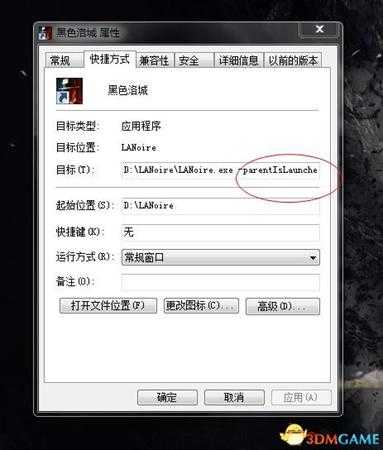
添加完之后打开游戏
然后在打开ArtMoney SE v7.40
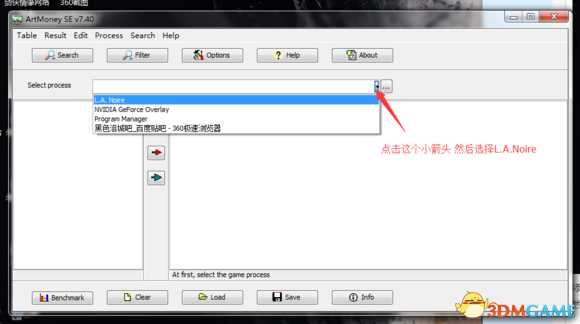
选择后点击搜索(search)这个选项
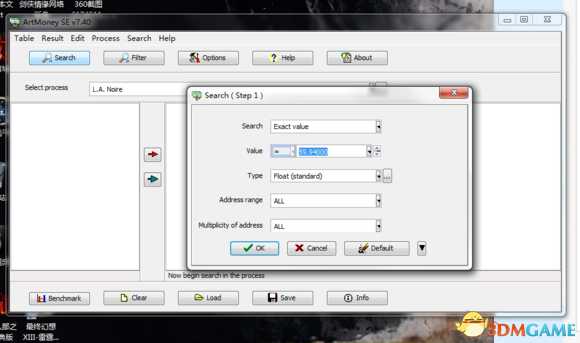
按照我图上设置的改,改完后点击OK
搜索完成后接着点OK ,
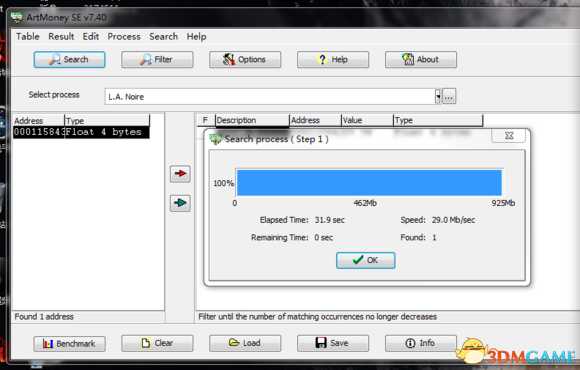
完成后会在左面的框里面出现一串代码吧。。应该是代码。。
之后双击
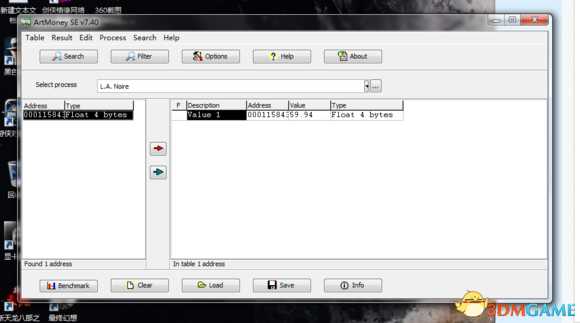
接着
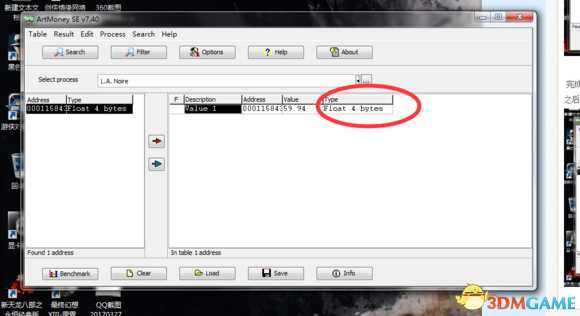
点击type下面的 float 4 bytes
打开后,找到 value 把里面的数值改成120。然后点击OK,就好啦。
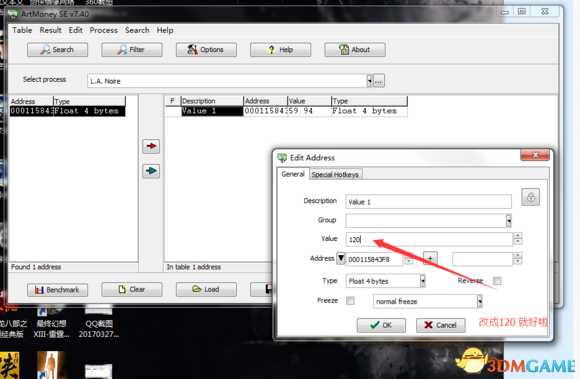
这样就完成了,然后在,切回,游戏。就能体验到60帧的黑色洛城啦。
免责声明:本站资源来自互联网收集,仅供用于学习和交流,请遵循相关法律法规,本站一切资源不代表本站立场,如有侵权、后门、不妥请联系本站删除!

更新日志
- 小骆驼-《草原狼2(蓝光CD)》[原抓WAV+CUE]
- 群星《欢迎来到我身边 电影原声专辑》[320K/MP3][105.02MB]
- 群星《欢迎来到我身边 电影原声专辑》[FLAC/分轨][480.9MB]
- 雷婷《梦里蓝天HQⅡ》 2023头版限量编号低速原抓[WAV+CUE][463M]
- 群星《2024好听新歌42》AI调整音效【WAV分轨】
- 王思雨-《思念陪着鸿雁飞》WAV
- 王思雨《喜马拉雅HQ》头版限量编号[WAV+CUE]
- 李健《无时无刻》[WAV+CUE][590M]
- 陈奕迅《酝酿》[WAV分轨][502M]
- 卓依婷《化蝶》2CD[WAV+CUE][1.1G]
- 群星《吉他王(黑胶CD)》[WAV+CUE]
- 齐秦《穿乐(穿越)》[WAV+CUE]
- 发烧珍品《数位CD音响测试-动向效果(九)》【WAV+CUE】
- 邝美云《邝美云精装歌集》[DSF][1.6G]
- 吕方《爱一回伤一回》[WAV+CUE][454M]